Claude Code and Codex usage widgets on your iPhone
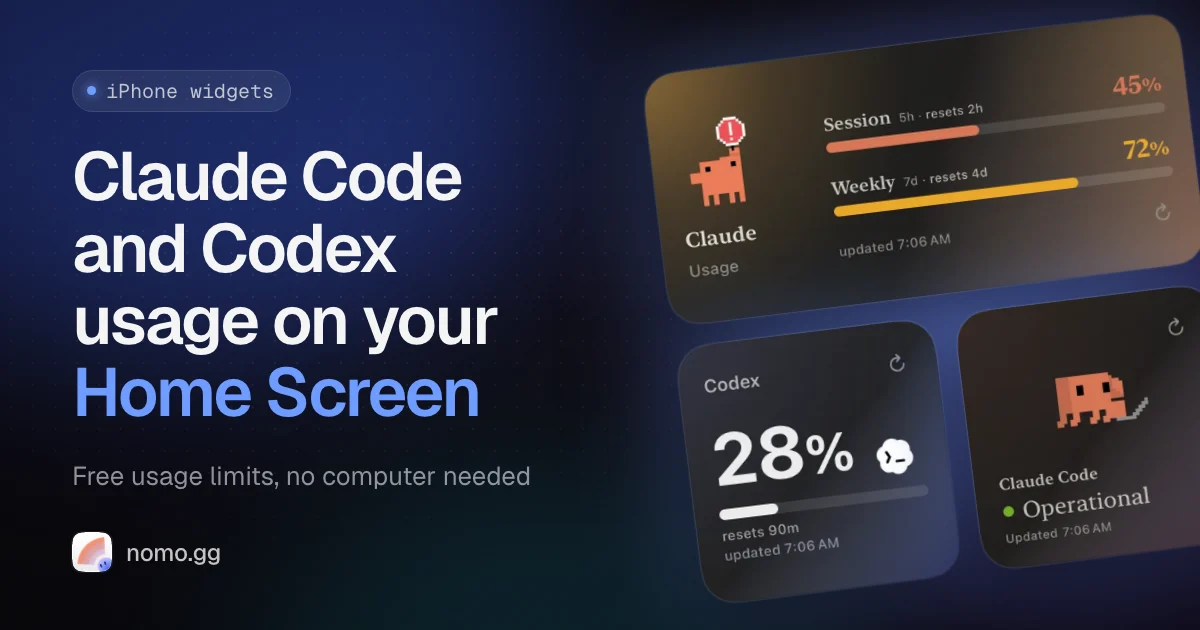
To see your Claude Code and Codex usage on your iPhone, connect your Claude and ChatGPT accounts in the free Nomo app, then add the Nomo Usage widget. It shows the 5-hour Session window and the Weekly window for one account, with a bar, a percentage and when each resets. No computer is needed. Add a second widget for the other account, and the free Nomo status widget if you also want to know whether Claude Code or Codex is down.
Below: the two kinds of "usage" and where each comes from, the exact setup, how often the widgets really update, and what Nomo Pro adds.
Is there an official Claude or Codex usage widget?#
For Claude, no. For Codex, users report one, but OpenAI hasn't announced it (as of November 2026).
- Codex: users on the OpenAI forum report a Codex usage widget in the ChatGPT app for iPhone, with your 5-hour and weekly limits (the forum thread). OpenAI's ChatGPT release notes don't list it yet, so look for it in your own widget gallery.
- Claude: the Claude app's widget has buttons for a new chat, dictation and the camera (Anthropic's help article). It doesn't show your limits.
- On the computer:
/usagein Claude Code shows your plan's usage limits (commands reference), and/statusin the Codex CLI shows the current chat's rate limits.
So if you use Claude Code, or both agents, a third-party widget is the way to get them on your Home Screen. That's what the rest of this post sets up.
Usage limits vs token activity: two different numbers#
"Usage" means two things, and they come from different places.
| Usage limits | Token activity | |
|---|---|---|
| What it is | % of your plan's 5-hour and weekly windows | Tokens your agents used, per day |
| Comes from | Your Claude / ChatGPT account | The Nomo plugin on a paired computer |
| Widgets | Nomo Usage (free), Nomo Pace, Nomo Accounts | Nomo Tokens, Nomo Activity |
| Updates | About every 10 minutes | Can be hours behind |
Usage limits answer "can I keep working?" They're the same numbers Claude Code's /usage shows, read from your account on the phone. Token activity answers "where did it go?": which model, which day, which computer. If you want the background on the windows themselves, this explains when each one resets:
 Keep readingClaude usage limit reset: the 5-hour and weekly windowsClaude usage limits reset 5 hours after your first message and weekly at a fixed time. See when yours resets, what each plan gets and how to reset early.
What you need#
- An iPhone with iOS 18 or later, and the free Nomo app.
- A Claude subscription and/or a ChatGPT account you use Codex with. Nomo reads your plan's limits through the account you sign in with. It isn't an API key, and there's nothing to paste.
- For token widgets only: Nomo Pro and a computer with the Nomo plugin (more below).
Step 1: connect Claude and Codex in Nomo#
Both start in the same place: open Nomo, tap the Providers tab, tap the provider, then Usage at the top. In that list, Codex lives under OpenAI.
Claude#
- Tap Connect Claude account. Claude's sign-in page opens.
- Sign in. Claude then shows you a code. Copy it.
- Go back to Nomo. It pastes the code and connects for you. If nothing happens, tap Paste, then Connect.
Codex#
- Under OpenAI, tap Connect Codex account. A sign-in page opens.
- Sign in with the ChatGPT account you use for Codex.
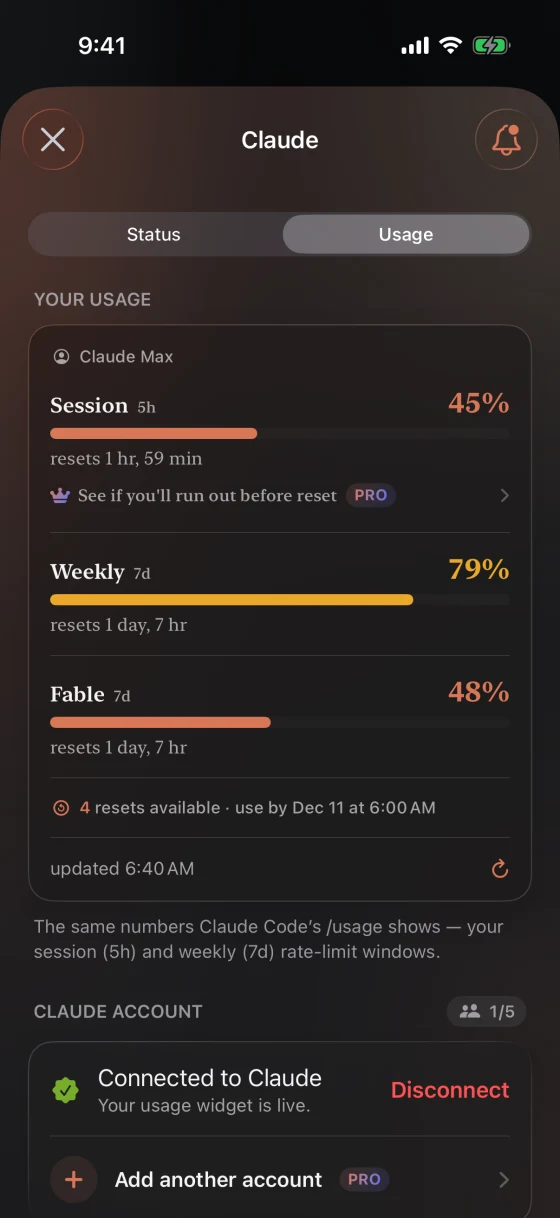
The page closes by itself. Either way, you'll see Connected to Claude (or Codex) and "Your usage widget is live." The sign-in stays in the iPhone's keychain and goes only to Anthropic or OpenAI (Signing in in the docs).
Step 2: add the Nomo Usage widget#
- Touch and hold an empty spot on your Home Screen, tap Edit, then Add Widget (Apple's guide).
- Search for Nomo, pick Nomo Usage, choose Small or Medium, and tap Add Widget.
- Touch and hold the new widget and tap Edit Widget.
- Set Provider to Claude or Codex.
- Account: leave it on Default unless you have more than one.
- Small widget style picks Big percentage or Big animation. Small widget focus picks the window the small size shows; Automatic chooses for you.
Repeat for the other provider. One widget shows one account.
Me, I love watching a cute widget every day to check my usage.
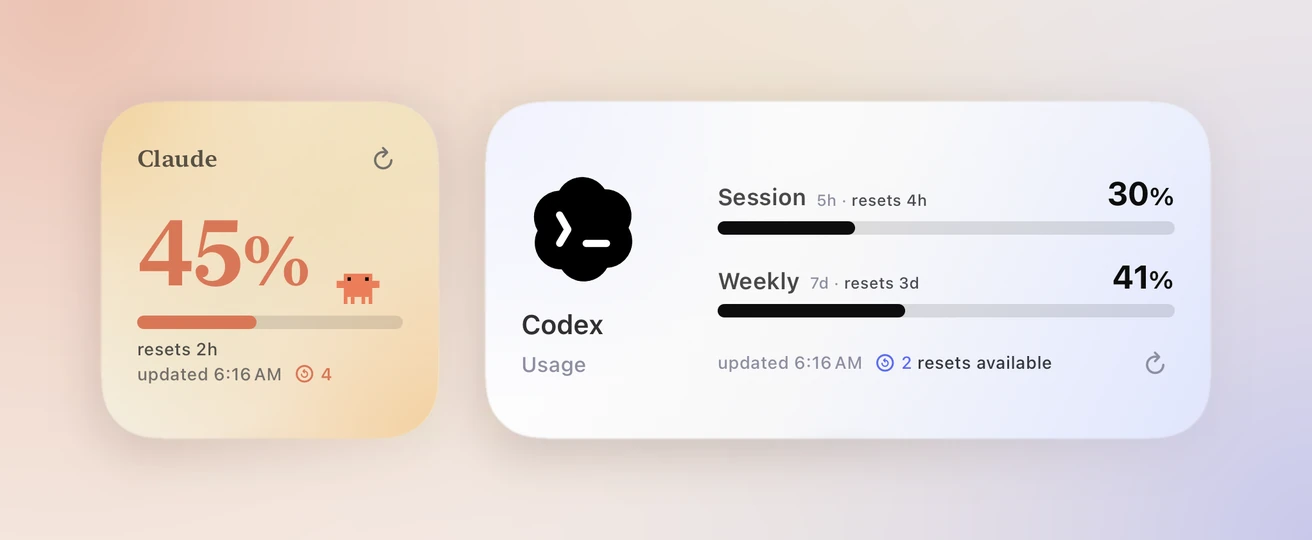
What's on it:
- Small: one window as a big percent, a bar and when it resets.
- Medium: Session (5 hours) and Weekly, each with a bar and its reset time.
- Bars turn amber at 70% and red at 90%. On a plan with no 5-hour limit, you'll see
No session limit. - If you have Claude or Codex resets to spend, the widget shows how many. Here's when it's worth spending one.
Tap the widget to open that provider's Usage page in Nomo. Details for every option are in free widgets in the docs.
Add a status widget for Claude Code and Codex#
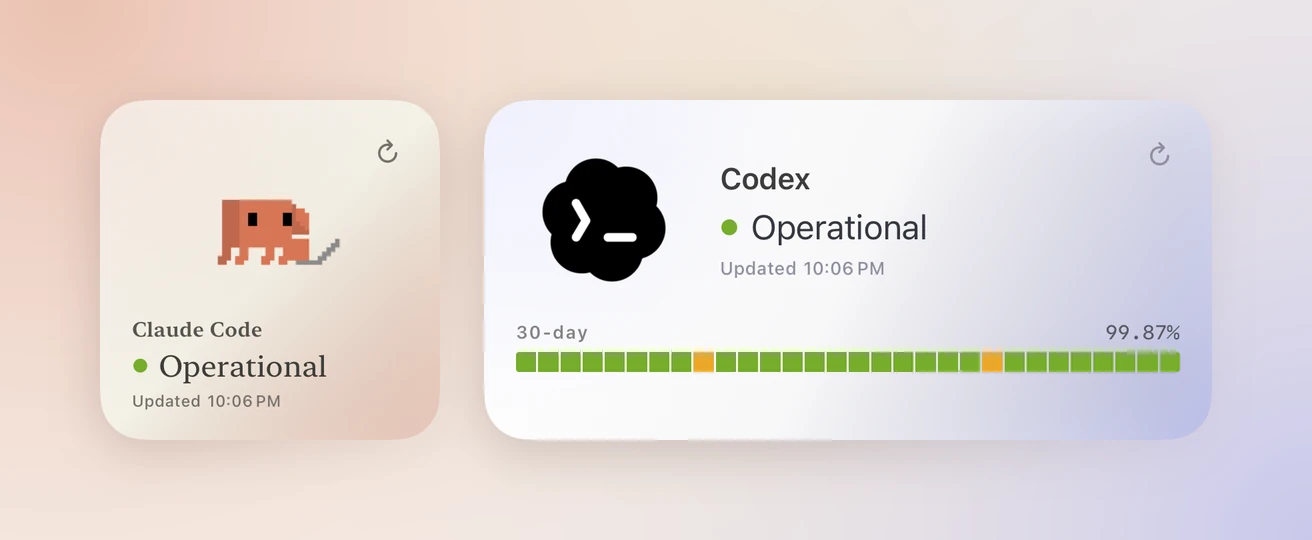
A limit isn't the only thing that stops you. The free Nomo widget shows whether one service is up right now, and it needs no sign-in at all.
- Add the widget called Nomo.
- In Edit Widget, set Provider to Claude and Service to Claude Code. For Codex, set Provider to OpenAI and Service to Codex.
It reads Operational, Degraded, Partial outage, Major outage or Maintenance. The medium size adds the last 30 days and an uptime percent.
How often do the widgets update?#
Not in real time. Widgets run on iOS's schedule, not Nomo's:
- Nomo Usage: Nomo asks iOS for a refresh about every 10 minutes. iOS decides when it actually happens, so it can be later.
- Nomo status: about every 15 minutes, on the same terms.
- Right now: tap the refresh button in the widget's corner. Nomo Usage and the status widget both have one.
If you'd rather be told than keep checking, turn on usage alerts in Settings → Alerts: a heads-up at 70%, 90% and 100% of each window, per account. Leave Nomo in the background instead of swiping it away, or iOS can pause them (usage alerts).
What Nomo Pro adds Pro#
Nomo Pro is $4.99 a month or $34.99 a year, billed by Apple. Everything above stays free. These are the Pro widgets that matter for Claude Code and Codex.
Nomo Pace: will the limit last?#
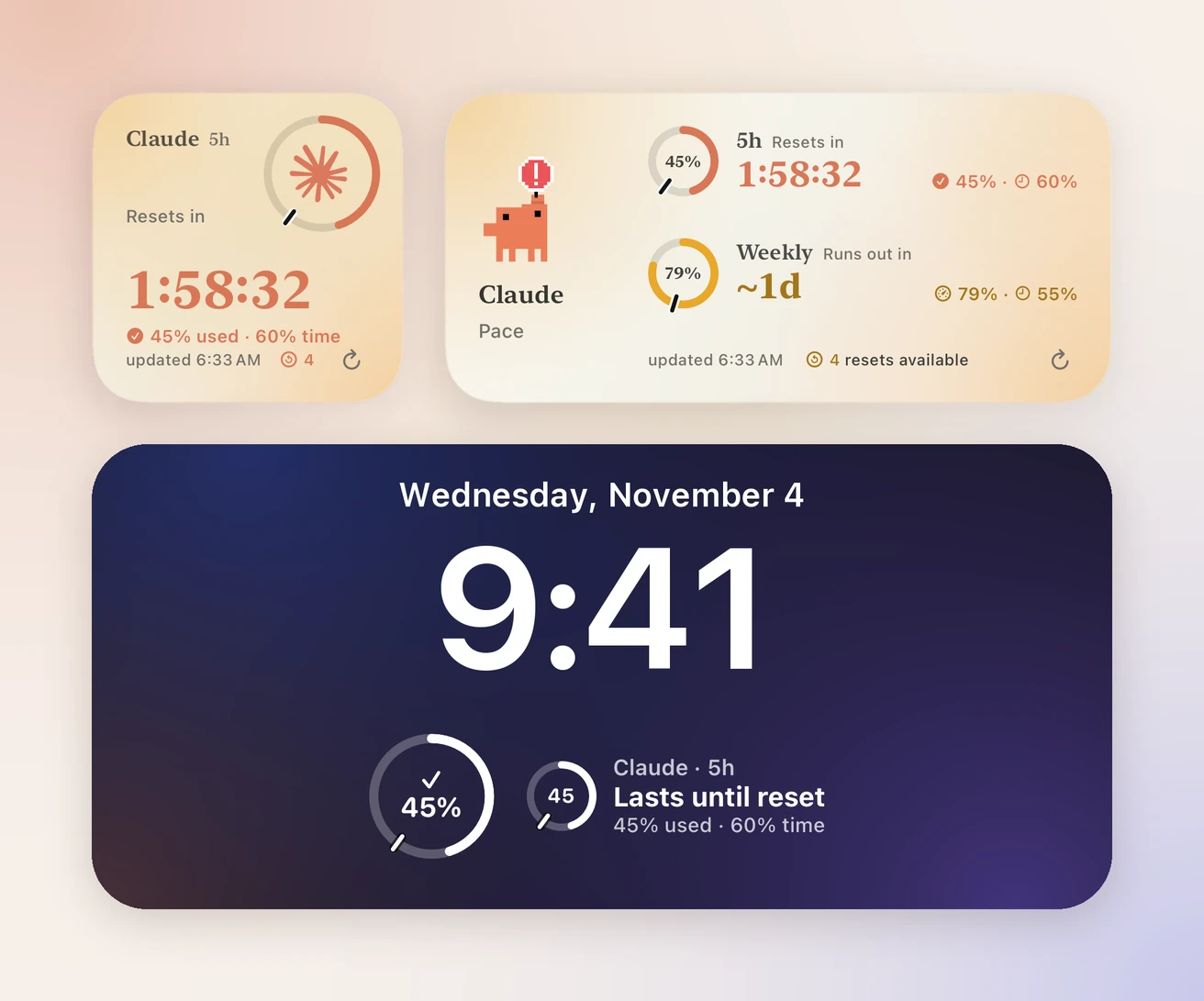
Nomo Pace compares how much of a window you've used with how much of its time has gone by, such as 45% used · 60% time. If you're fine, it counts down Resets in. If you're going too fast, it shows Runs out in with an estimate, in amber. It also comes in Lock Screen sizes (Nomo Pace).
Nomo Accounts: every account on one board#
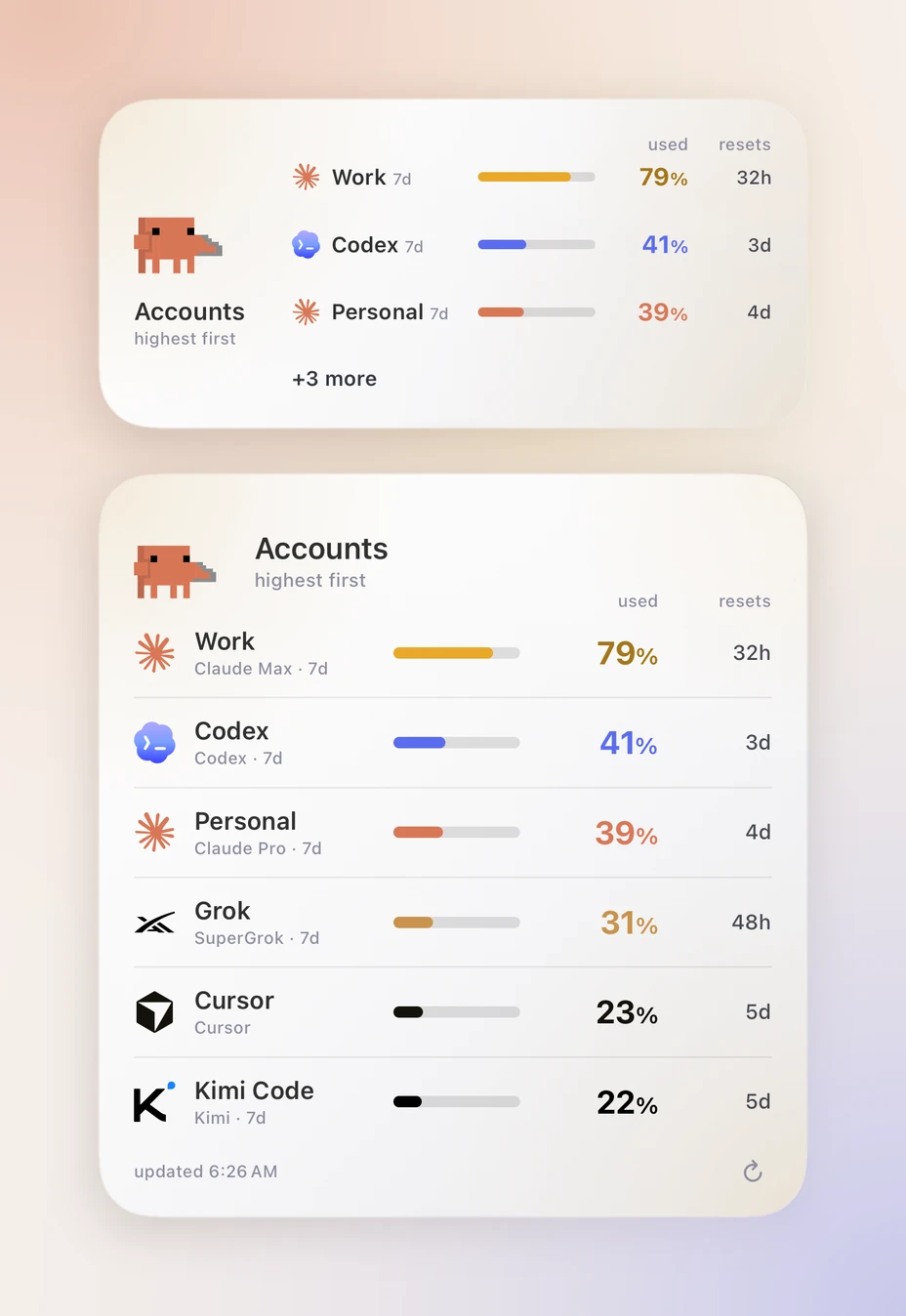
With Nomo Pro you can add up to 5 accounts per provider, such as a work and a personal Claude account. Nomo Accounts puts every connected account, from every provider, on one widget, with the one that has the least left at the top. Medium shows 4 rows, Large shows 8 (Nomo Accounts).
Nomo Tokens and Nomo Activity: token activity#
These two use the other kind of usage. Nomo Tokens charts the last 14 days of tokens by model (input, output and reasoning; cache left out). Nomo Activity shows your streak and a map of the days you coded.
They need more than a sign-in:
- Nomo Pro.
- The Nomo plugin, version 2.4.0 or later, on each computer where Claude Code or Codex runs. Install it with
bunx nomo-ai. - That computer paired with Nomo: Sessions → Pair a Computer, then scan the QR code (pairing).
The numbers come from the computer, not your account, so they lag. The plugin sends a summary at most every 6 hours. Nomo fetches it when you open the app, at most once an hour, and opening the Activity screen fetches it right away (Nomo Activity).
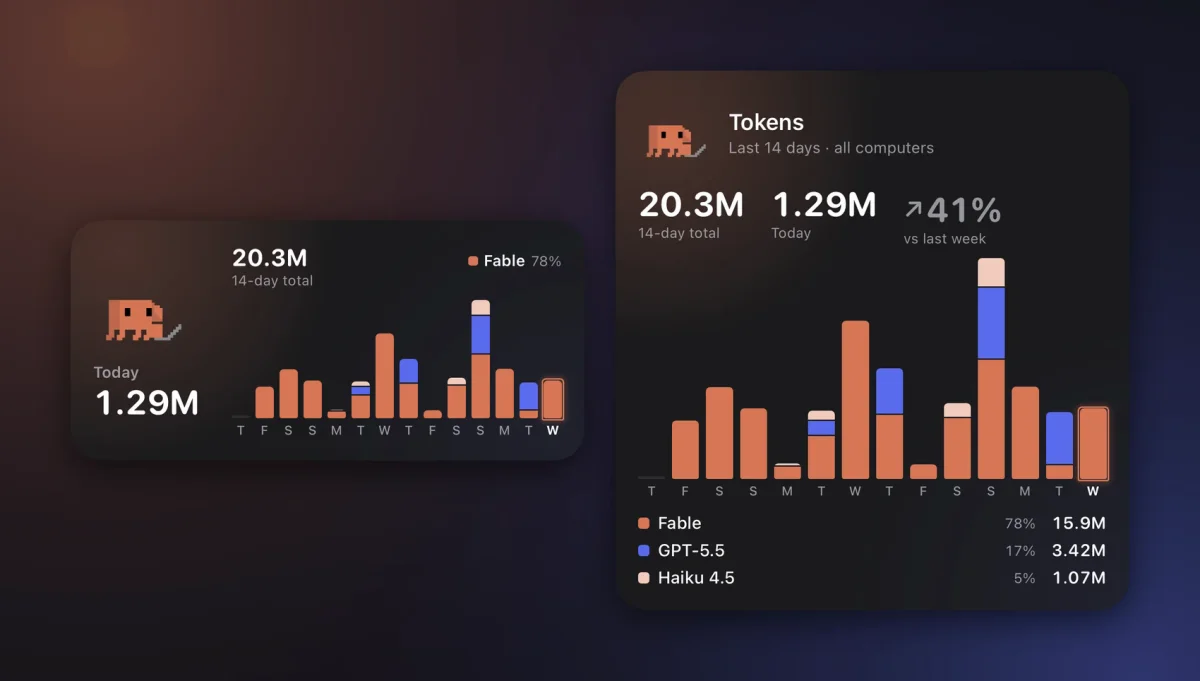
What tokens are, and how /usage and ccusage count them on the computer, is its own post:
 Keep readingHow to track Claude Code and Codex token usageTrack Claude Code and Codex token usage per day and per model with /usage, ccusage or one chart that adds up every computer, right on your iPhone.
What Nomo can't do#
- One account per widget. Nomo Usage and Nomo Pace each watch one account. Use one widget per provider, or Nomo Accounts.
- No API keys. Usage limits come from your Claude or ChatGPT sign-in. There's no place to enter an API key.
- Token activity is per paired computer. Claude Code or Codex on a computer that isn't paired, or that runs a plugin older than 2.4.0, isn't counted (when a computer isn't counted).
- Not real time. See the refresh times above.
Nomo is an independent app, not affiliated with Anthropic or OpenAI.
Next steps#
Get Nomo on the App Store, connect Claude and Codex, and add the two widgets. Every option is in the docs: adding a widget, free widgets and Pro widgets.
Got a reset waiting in your account? Here's when to spend it:
 Keep readingClaude and Codex resets: when to spend one, when to waitGot a free Claude or Codex limit reset? Where to find it, what it does to your weekly limit, and when spending it now beats waiting for the clock.
FAQ#
Is there an official Claude Code usage widget for iPhone?
Not from Anthropic, as of November 2026. The Claude app's widget starts a chat, dictation or a photo; it doesn't show limits. For Codex, users report a Codex usage widget in the ChatGPT app, but OpenAI's release notes don't mention it yet.
Do I need a computer to see my limits on the widget?
No. Usage limits come from your Claude or ChatGPT sign-in on the iPhone. You only need a paired computer with the Nomo plugin for token activity (Nomo Tokens and Nomo Activity, Nomo Pro).
Is the widget real time?
No. Nomo asks iOS to refresh the usage widget about every 10 minutes, and iOS decides when it actually runs. Tap the refresh button in the widget's corner to update it now.
Can one widget show Claude and Codex together?
Nomo Usage shows one account per widget, so add one for Claude and one for Codex. With Nomo Pro, Nomo Accounts puts every connected account on one board, the one with the least left at the top.
Does Nomo see my Claude or ChatGPT password?
No. You sign in on Anthropic's or OpenAI's own page. The sign-in is kept in the iPhone's keychain and goes only to that provider. Usage is fetched on the phone and never passes through Nomo's servers.