Claude and Codex resets: when to spend one, when to wait
A limit reset is a free refill that Anthropic or OpenAI drops into your account now and then. Spend it when you're close to a limit and the natural reset is still far away. On Claude, a reset adds usage without moving your weekly reset day, so spending it the night before your week refreshes wastes it. On Codex, redeeming restarts your weekly clock, so the best moment is when you're nearly out with days still to go. Either way, use the one that expires first and don't let it lapse.
Below: where reset news comes from, how each provider's reset actually works, step-by-step redemption, and a short playbook for when to spend one.
What a limit reset is#
It's a one-time refill of your usage limit, given as a promotion or as an apology after an outage. You don't buy it and it doesn't raise your plan. It sits in your account until you use it or it expires.
On Claude, Anthropic gives three kinds (Anthropic's limit resets article):
- Five-hour reset: your 5-hour session limit back to full.
- Weekly reset: your weekly limit back to full.
- Fable reset: only the weekly usage you spent on Fable models comes back, plus a full 5-hour refill.
On Codex, OpenAI calls the saved kind a banked reset. It also runs automatic resets, applied to everyone at once and never stored, and sells paid resets to some Plus and Pro accounts (OpenAI's help center). Free resets are promotional: no schedule, and each offer sets who gets one and when it expires.
Where reset news comes from#
Both teams announce resets on X first, usually with the expiry date. As of November 2026, these are the two to watch.
Anthropic posts on @ClaudeDevs. The latest is a full reset for paid plans, after a run of limit bugs:
ClaudeDevs @ClaudeDevs · Nov 10, 2026 A free full reset for paid Claude plans, to use by December 10. View the post on X →For Codex, it's Tibo (Thibault Sottiaux), who leads Codex at OpenAI and has handed out resets all year:
Tibo @thsottiaux · Nov 12, 2026 Another banked reset is on its way to Codex accounts. View the post on X →You don't need to catch the post, though. A reset lands in your account whether you saw the announcement or not. It just sits there until you look.
Claude vs Codex: the difference that matters#
The two look the same in the app, but they treat your week differently.
| Claude | Codex | |
|---|---|---|
| Weekly reset day | Stays the same | Restarts when you redeem |
| Use it before a limit? | Yes, any time | Only once there's usage to restore |
| Where to redeem | Settings → Usage | Usage settings or /usage |
| Kinds | 5-hour, weekly, Fable | Banked, automatic, paid |
That first row is the whole strategy. A Claude reset is extra usage on top of your week. A Codex reset pulls your next week forward to today.
How to use a reset on Claude#
- Open Settings → Usage on claude.ai, in Claude Desktop or in the Claude mobile app.
- Find the Limit resets section. Each reset shows what it refills and when it expires.
- Tap Reset for free and confirm.
The same button appears on the message you see when you hit a limit. It isn't in Claude Code's terminal or IDE, but limits are shared across your account, so Claude Code gets the refill too. You can't undo it.
How to use a reset on Codex#
- In the Codex desktop app, open Settings → Usage & billing. On the web, it's Settings → Usage → Usage limit resets at chatgpt.com.
- Pick the reset and redeem it.
- In the Codex CLI, run
/usageand choose the reset option. If your version doesn't show one, use the desktop app or the web.
If nothing needs restoring yet, Codex doesn't spend it. There's also an optional desktop setting, Allow your assistant to use resets, that lets Codex suggest one once your 5-hour or weekly allowance is down to 10%, and it asks before using it.
When to spend a reset: a short playbook#
1. Check how far away the natural reset is. Your usage page shows when each window resets. If your week refreshes tomorrow anyway, a reset buys you almost nothing.
2. On Claude, spend it when the wall is far. Your weekly day doesn't move, so the best moment is early or mid-week with the weekly bar nearly full. Since there's no threshold, you can also spend one right before a long task you know will burn through the rest.
3. On Codex, spend it when you're nearly out with days left. Redeeming starts a fresh week from now, so time left on the old week is gone. Out on Tuesday with a Saturday refresh? That's the moment. Out on Friday night with a Saturday refresh? Wait. After redeeming, note your new weekly reset day.
4. Match the type to the work. A Fable reset only brings back Fable usage. Spending it while you're blocked on the weekly limit for other models fixes nothing. Save it for Fable-heavy work.
5. Use the one that expires first. Holding several? Spend the soonest expiry first. Unused resets don't roll over, and on Claude a downgrade or cancellation takes them with it.
6. Don't redeem right before an automatic reset on Codex. If OpenAI resets everyone the next day, your banked one doesn't come back. You can't predict these, so if Tibo hints one is coming, it's worth holding for a day.
Where Nomo fits#
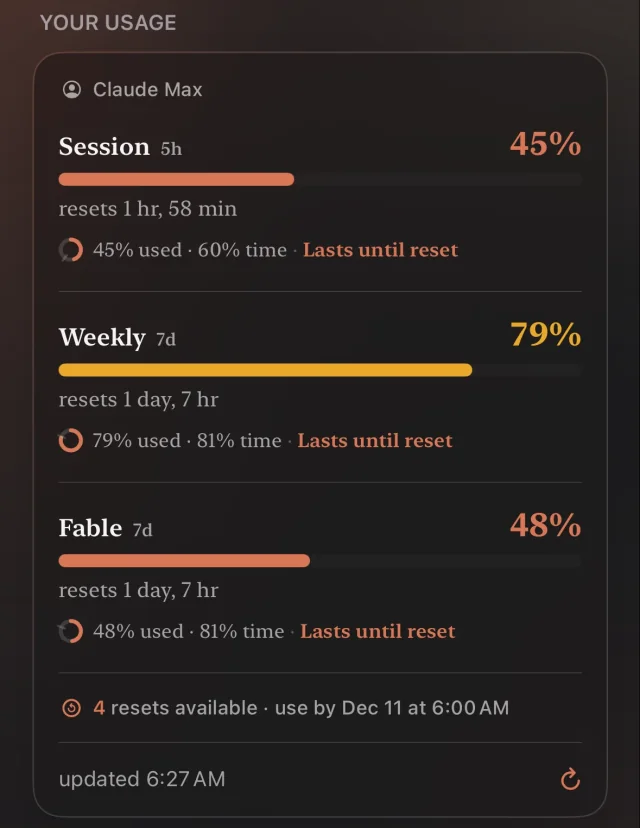
Resets are easy to miss for a dull reason: they sit in a settings page you open once a month. Nomo puts them where you already look. On the Usage tab, your Claude and Codex cards show a line like 4 resets available · use by Dec 11 at 6:00 AM, in your time zone, and the Nomo Usage widget on your Home Screen shows the count.
Nomo also reminds you 1 week and 1 day before a reset expires. The reminders follow your usage alerts for that provider, so there's no extra switch to find. Nomo only reads the count and the expiry. It never spends a reset, so that's still your tap at Claude or ChatGPT.
Resets and reminders need Nomo 2.4.2. Get Nomo on the App Store and read available resets in the docs.
Want to know when your limits reset on their own, without spending anything? That's this one:
 Keep readingClaude usage limit reset: the 5-hour and weekly windowsClaude usage limits reset 5 hours after your first message and weekly at a fixed time. See when yours resets, what each plan gets and how to reset early.
FAQ#
Does a Claude limit reset change my weekly reset day?
No. Anthropic's help center says your weekly limits still reset on their usual day and time. The reset refills your usage on top of that schedule.
Does a Codex reset change my weekly reset day?
Yes. OpenAI's help center says using a full reset restarts your 5-hour and weekly periods and changes your weekly reset date, so your next week starts from the moment you redeem.
Can I use a Claude reset from Claude Code?
Not from the terminal or the IDE. Use Reset for free in Settings → Usage on claude.ai, Claude Desktop or the Claude mobile app. Limits are shared across your account, so Claude Code gets the refill too.
Do unused resets roll over?
No. Each reset has its own expiry, shown in your usage settings. An unused Claude reset also disappears if you downgrade or cancel before using it.
Will Nomo use a reset for me?
No. Nomo only shows how many resets you have and when they expire, and reminds you before they do. Spending one is always your tap, at Claude or ChatGPT.