How to track Claude Code and Codex token usage
To track Claude Code token usage, run /usage in Claude Code for the current session's tokens by model, and bunx ccusage in a terminal for a day-by-day history with costs. Codex shows the current chat with /status, and bunx ccusage codex daily gives its history. All of these read only the computer you run them on. To add up every computer and see it on your phone, Nomo Pro's Activity screen and Tokens widget chart your daily tokens per model across all of them, with a streak.
Below: what each tool shows, why their numbers never quite match, and how to pick one.
What "token usage" actually means#
A token is a small chunk of text, a few characters long. Every request your agent makes is measured in four kinds of tokens: input (what's sent to the model), output (what it writes back, thinking included), cache read (context the model has already seen, served from the prompt cache) and cache write.
Cache is the one that surprises people. Claude Code sends your whole conversation with every request, and most of it comes back from the cache. Here's the example from Anthropic's cost docs:
Usage by model:
   claude-sonnet-4-6:  1.2k input, 5.3k output, 940.0k cache read, 50.0k cache write ($0.55)
Nearly a million cache tokens next to 6.5k of real input and output. So when two tools disagree by 10×, check first whether one of them counts cache.
The other thing to keep straight: tokens aren't your plan limit. On Claude Pro, Max or Ultra, or a ChatGPT plan, you aren't billed per token. Your limits are the 5-hour and weekly windows (here's how those reset). Token counts tell you where the usage went: which model, which day, which computer.
How to check token usage inside Claude Code#
Run /usage. On a subscription, it shows your plan limit bars, activity stats and a breakdown of what counted against your limits. The Session block at the top lists the current session's tokens by model, as in the example above, plus a dollar estimate at list price. /cost and /stats are aliases; /stats opens straight on the Stats tab (commands reference).
A few things to know:
- It's per session. The Session totals reset when
/clearstarts a new session. - The breakdown is per machine. Anthropic's docs say it's "computed from local session history on this machine, so usage from other devices or claude.ai is not included." Press
dorwto switch between the last 24 hours and the last 7 days. /insightsis about habits, not totals. It writes an HTML report on how you work across recent sessions on that machine.
On a Team or Enterprise plan, the admin side has per-user spend reports and an analytics dashboard; on the Claude Console, the Cost page does the same for API keys.
How to check Codex token usage#
In the Codex CLI, /status shows the chat ID, context usage and rate limits for the current chat (Codex slash commands). That's enough to see how full the context is. It doesn't keep a history by day or by model.
For that, use the same third-party tool as for Claude Code, below.
Daily token history with ccusage#
ccusage is an open-source CLI that reads the session logs Claude Code and Codex already keep on your disk and turns them into reports. Nothing to install with Bun:
bunx ccusage            # daily report (the default)
bunx ccusage monthly    # one row per month
bunx ccusage session    # one row per session
bunx ccusage codex daily
Each row has input, output and cache tokens, the models used and an estimated cost. It also has weekly reports and JSON output if you want to script it.
Two limits are worth knowing. The cost column is an API-price estimate, not a bill, if you're on a subscription. And ccusage says plainly that it "only analyzes data from your current machine." If you code on a MacBook in the day and a Mac mini at night, you get two separate histories.
Which one should you use?#
| Tool | Shows | Covers |
|---|---|---|
/usage in Claude Code | This session, plan bars | One computer |
/status in Codex | This chat's context, limits | One chat |
bunx ccusage | Daily, monthly, per session | One computer |
| Nomo Pro | Daily per model, streak | Every paired computer |
For a quick "how much did this session cost?", /usage is right there. For a proper history on one machine, ccusage is hard to beat, and it's free. The gap is everything across machines, and anything you can glance at without opening a terminal.
Where Nomo fits#
Nomo is an iPhone app for people who work with AI coding agents, and in version 2.4.0 Nomo Pro got an Activity screen and new widgets built on exactly this data. The Nomo plugin on each computer reads the history your agents already keep and sends a daily summary to your phone. It counts Claude Code, Codex and OpenCode.
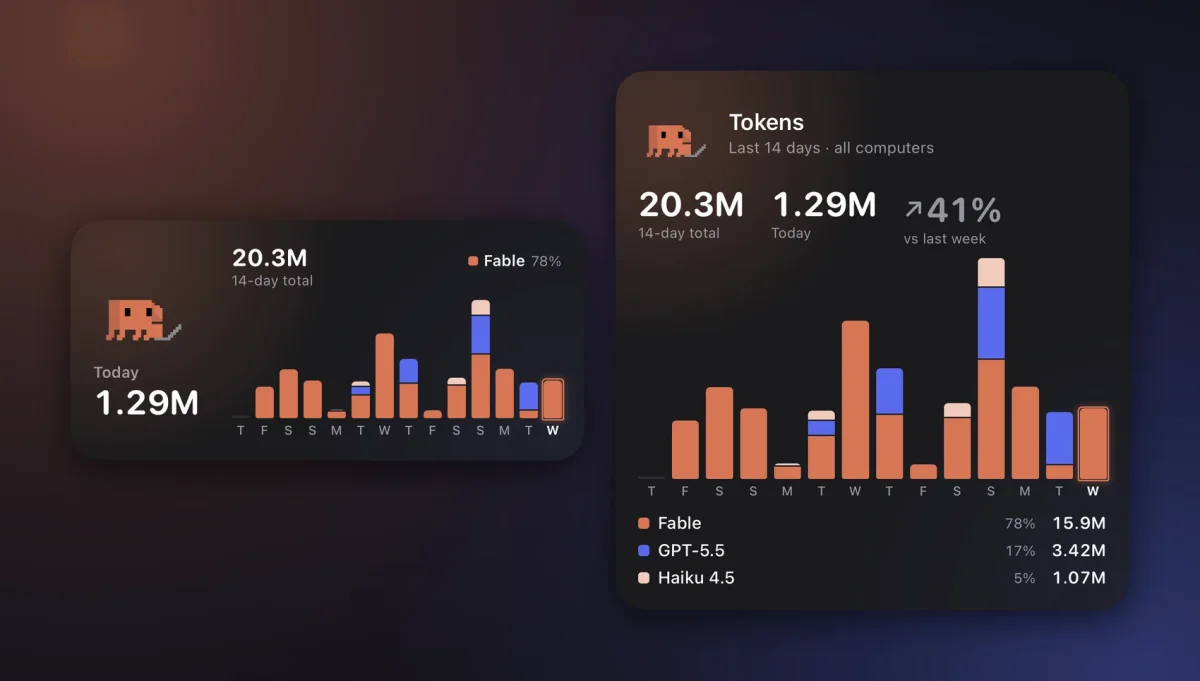
- Nomo Tokens (widget): your last 14 days as bars stacked by model, today's total, and on the large size the change from last week and your top four models. It counts input, output and reasoning, and leaves cache out on purpose so the real work isn't buried.
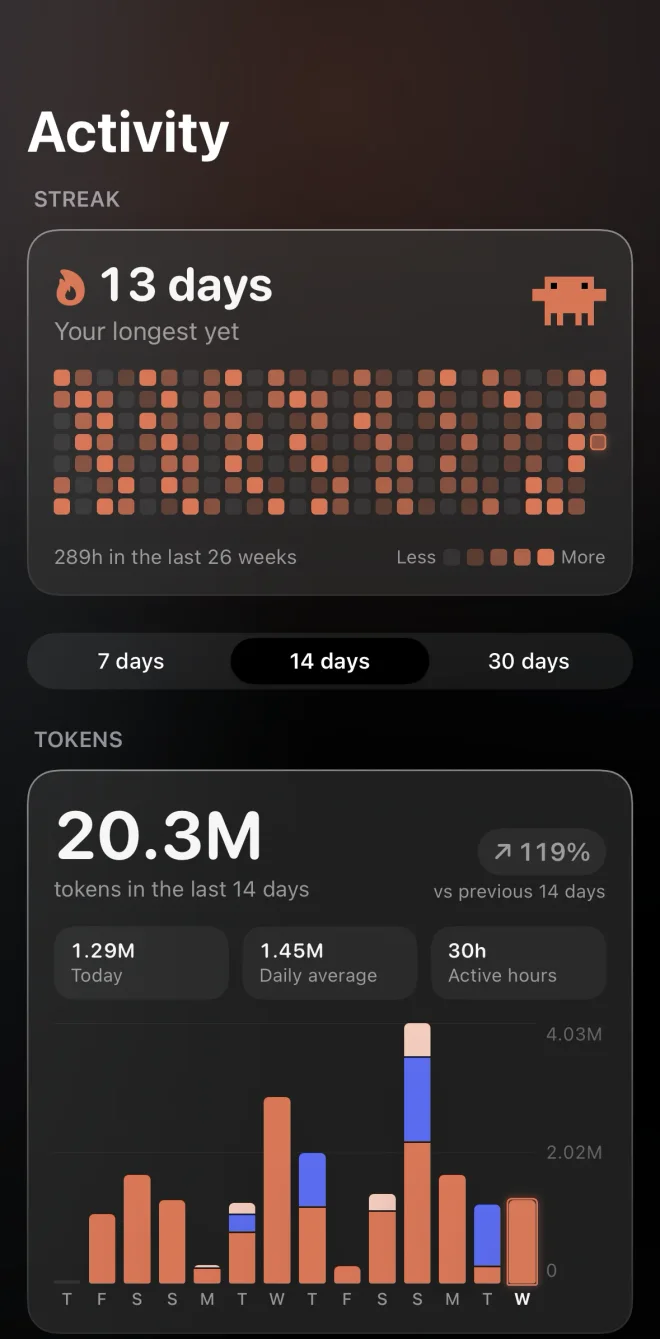
- The Activity screen: your streak and a 26-week map of the days you coded, a 7 / 14 / 30-day token chart, and a By model table with input, output, cache and total.
- Every computer at once: tokens and sessions add up across paired computers, and time on two Macs at once counts only once.
- Nomo Activity (widget): your streak and a GitHub-style map on the Home Screen or Lock Screen. On iOS 26.1 and later, the streak also rides in a small bar above the Sessions tab bar.
- Wrapped: your week, month or year as one image to share, with your busiest day, favorite model and longest streak. No prompts, project names or file paths on it.
What leaves your computer is counts only, end-to-end encrypted with your pairing key: sessions, prompts, active 5-minute slots and tokens per model per day. Never your prompts, replies, project names or file paths. The plugin uploads at most every 6 hours, so the chart can run a few hours behind.
To set it up, run bunx nomo-ai on each computer, pair it from the app, then add the widgets. Activity needs plugin 2.4.0 or later; on a computer that already has Nomo, the same command shows how to update the plugin. Get Nomo on the App Store and see Nomo Tokens and the Activity screen in the docs. The same update added a Pace widget that tells you whether your 5-hour and weekly limits will last until they reset, and room for up to five accounts per provider. And if those long sessions keep asking for permission, you can approve Claude Code from your iPhone too.
FAQ#
Does /usage in Claude Code show usage from all my computers?
No. Anthropic's docs say the breakdown is computed from local session history on that machine, so usage from other devices or claude.ai isn't included. Your plan limit bars are account-wide, though.
Is the dollar cost in ccusage what I actually pay?
Not on a subscription. Claude Pro, Max and Ultra and the ChatGPT plans aren't billed per token, so a dollar figure is what those tokens would cost at API list prices. It's useful for comparing days, not as a bill.
Why is my cache token count so huge?
Every request re-sends the conversation, and most of it is read from the prompt cache. Cache reads are cheap, but they pile up into numbers far bigger than your input and output. That's why Nomo's Tokens chart leaves cache out and the Activity screen lists it in its own column.
Does Nomo count Cursor or Antigravity tokens?
Not yet. Nomo Activity, Nomo Tokens and Wrapped count Claude Code, Codex and OpenCode. Cursor and Antigravity sessions still show up live in the Dynamic Island and the Sessions tab.
Does Nomo see my prompts or code to count tokens?
No. The plugin sends daily counts only: sessions, prompts, active 5-minute slots and token totals per model. It's end-to-end encrypted with your pairing key, and the relay deletes it after 35 days.